




Details
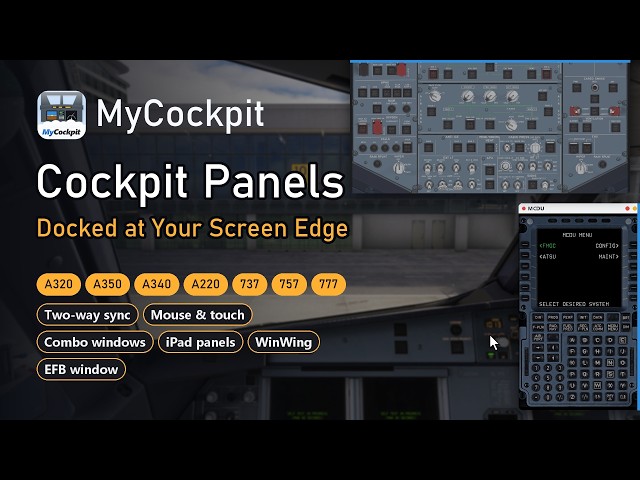
MyCockpit puts your aircraft's panels on your own screen: overhead, radios, transponder, FCU, landing gear, MCDU and EFB – rendered for real and synced live with the aircraft. Use them in their own windows, docked at a screen edge, on a second monitor, on an iPad or tablet in its browser, or with WinWing hardware.
This product is one MyCockpit panel code. One code activates one aircraft panel of your choice on your MyCockpit account. MyCockpit itself is a free download; viewing the panels and WinWing hardware support are free. Working a panel on screen (clicks, turns, touch) is activated aircraft by aircraft with a panel code.
Highlights
- Edge docking – drag a window to a screen edge and it docks there; move the mouse to the edge and it slides out. Overhead at the top, MCDU on the right, EFB on the left.
- Every major airliner – 16 panels across Airbus, Boeing, McDonnell Douglas, Bombardier and Embraer (full list below). MyCockpit recognises the aircraft you load and switches panels by itself.
- Two-way sync – work a switch on the panel and the aircraft responds; lights in the cockpit light up on the panel.
- One input logic for mouse and touch – tap, hold and slide; push / pull knobs, inner and outer rings, a zoom dial for small knobs.
- Combo windows – up to five windows of your own, built from the modules you need, with cropping and alignment tools.
- iPad and tablets – pair by QR code and use the panels in the browser, nothing to install.
- WinWing hardware – FCU / EFIS, ECAM, AGP, URSA MINOR throttle and sidestick follow the aircraft, displays and lights included.
- EFB in a window – the aircraft's own EFB in its own window, optionally in Chinese or Japanese.
- Interface in English, Chinese and Japanese. Updates are automatic.
Supported aircraft
One panel code activates one of the panels below. The aircraft itself is sold separately.
- Fenix A319 / A320 / A321
- FSLabs A321 / A321neo
- FlyByWire A32NX
- iniBuilds A220-300
- iniBuilds A340-300
- Aerosoft A340-600
- iniBuilds A350-900 / A350-1000
- FlyByWire A380X (A380-842)
- iniBuilds A380-800
- PMDG 737-600 / 700 / 800 / 900
- iFly 737 MAX 8
- BlueBird 757-200
- PMDG 777-200ER / 200LR / 300ER / 777F
- TFDi Design MD-11 / MD-11F
- Aerosoft CRJ550 / 700 / 900 / 1000
- FSS E170 / E175 / E190 / E195 / E190F / E195F
How to redeem
- Download MyCockpit (included in this product, or from iannouncer.com/mycockpit) and install it.
- Register / sign in with your e-mail in Settings › Account; your account key is e-mailed to you.
- In Settings › Licenses enter the panel code, then press Redeem on the row of the aircraft you want.
- Download that aircraft's panel pack in Settings › Aircraft packs.
Buy one code per aircraft you want to work. One account can be signed in on one PC at a time.
Tags
Requirements
Windows 10 / 11 (64-bit)
Microsoft Flight Simulator 2020 or 2024
One of the supported add-on aircraft (Fenix A319/A320/A321, FSLabs A321/A321neo, iniBuilds A350 / A340-300 / A220-300, Aerosoft A340-600, PMDG 737 / 777, iFly 737 MAX 8, BlueBird 757-200, FlyByWire A32NX / A380X, iniBuilds A380-800, TFDi MD-11 / MD-11F, Aerosoft CRJ, FSS E-Jet) – sold separately
A free MyCockpit account (e-mail) and an internet connection for sign-in and activation
Optional: iPad or tablet on the same network; WinWing FCU / EFIS, ECAM, AGP, URSA MINOR throttle or sidestick
Customers who bought this product also purchased

€ 19.99
$
USD 21.97
All sales based on Euro. Other currencies shown as reference only.£
GBP 16.74
All sales based on Euro. Other currencies shown as reference only.¥
CNY 146.70
All sales based on Euro. Other currencies shown as reference only.
€ 14.99
$
USD 16.47
All sales based on Euro. Other currencies shown as reference only.£
GBP 12.55
All sales based on Euro. Other currencies shown as reference only.¥
CNY 110.01
All sales based on Euro. Other currencies shown as reference only.
€ 19.99
$
USD 21.97
All sales based on Euro. Other currencies shown as reference only.£
GBP 16.74
All sales based on Euro. Other currencies shown as reference only.¥
CNY 146.70
All sales based on Euro. Other currencies shown as reference only.
€ 20.99
$
USD 23.07
All sales based on Euro. Other currencies shown as reference only.£
GBP 17.58
All sales based on Euro. Other currencies shown as reference only.¥
CNY 154.04
All sales based on Euro. Other currencies shown as reference only.
€ 39.99
$
USD 43.95
All sales based on Euro. Other currencies shown as reference only.£
GBP 33.49
All sales based on Euro. Other currencies shown as reference only.¥
CNY 293.48
All sales based on Euro. Other currencies shown as reference only.
24.00
€ 19.20
$
USD 26.38
All sales based on Euro. Other currencies shown as reference only.£
GBP 20.10
All sales based on Euro. Other currencies shown as reference only.¥
CNY 176.13
All sales based on Euro. Other currencies shown as reference only.
-20%
30-day price low:
€
24.00

€ 6.50
$
USD 7.14
All sales based on Euro. Other currencies shown as reference only.£
GBP 5.44
All sales based on Euro. Other currencies shown as reference only.¥
CNY 47.70
All sales based on Euro. Other currencies shown as reference only.
€ 16.00
$
USD 17.58
All sales based on Euro. Other currencies shown as reference only.£
GBP 13.40
All sales based on Euro. Other currencies shown as reference only.¥
CNY 117.42
All sales based on Euro. Other currencies shown as reference only.