




Details
FWX Helicopter All-in-One Bundle: all four FWX add-ons for helicopters in Microsoft Flight Simulator 2024, with flight dynamics, turbine sound, rotor shadow and rotor blade haptics
Four add-ons work on four parts of the same flight. The handling under you, the sound around you, the shadow on the ground, the rotor in your seat.
What is this bundle? The four parts do not replace any flight model and do not rewrite any flight model or aircraft files: the simulator's flight model stays fully in force and keeps computing as designed, and the simulator itself executes all of it. Flight dynamics and haptics work on every helicopter in Microsoft Flight Simulator 2024, the rotor shadow on the seven types where it disappears in the simulator. Only the sound part works exclusively on the EC135, the other three parts are not tied to one type.
The flight dynamics: how the machine handles, not how the camera moves
Flight dynamics is the heart of this bundle. Your helicopter stops holding itself in the hover. It comes alive under you and asks to be flown.
Pitch, roll and climb follow the actual attitude, and your control inputs take effect immediately. Hover and forward flight can be adjusted separately, every axis can be switched on its own, and the strength is infinitely variable from zero to full, at any second of the flight.
Handling, shadow and blade beats are not precomputed: they are built live from flight data, control inputs and the real rotor speed. The sound part's strength lies elsewhere: recordings of a real EC135 instead of the flat stock sounds.
The turbine sound: real recordings instead of the stock sounds
The sound part replaces the EC135 sounds completely, inside and out, with recordings of a real EC135: cold start, spool-up, idle, flight, shutdown. It is the only part of the bundle that works on the EC135 alone.
- Both engines work separately: uneven start, uneven shutdown, single-engine taxi
- The start sequence can be aborted at any point, like on the real aircraft
- The sound follows the work of the turbine, not the rotor speed: the governor, which holds the rotor speed constant by itself, keeps it steady while the turbine has to work harder as soon as more power is needed. That is exactly what you hear. When power is reduced, the turbine audibly eases and the rotor speed stays up
- Seamless from the starter into the running turbine, smooth torque transitions instead of abrupt tonal jumps
From outside the characteristic twin-turbine whine, plus rotor downwash, flyby and hover. And above all the Fenestron, the shrouded tail rotor of the EC135: its sound is the signature of this type, and that is exactly how you hear it from outside.
The rotor shadow: the shadow that disappears above a certain rotor speed
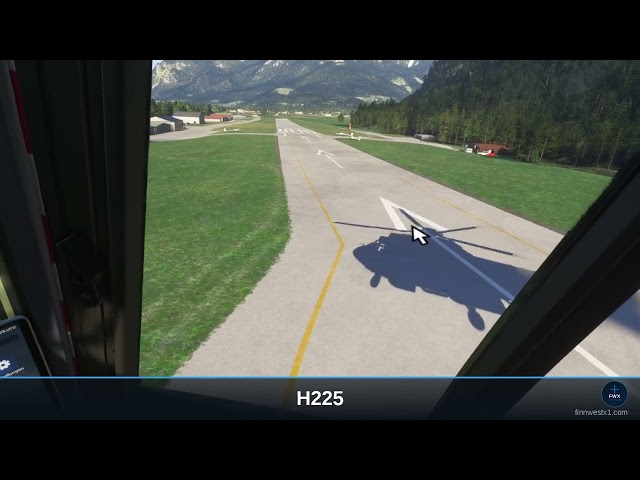
The rotor shadow part covers seven well-known types, all other helicopters have their shadow anyway. A rotor turns above the pilot, yet on these seven its shadow disappears completely in the simulator above a certain rotor speed: visible while starting, then suddenly gone once the rotor is up to speed. This bundle gives it back: it turns with the real rotor speed, tilts with the machine and shows main and tail rotor separately, so two shadows instead of one dark blob. Every type is individually calibrated.
- Airbus H125
- Airbus H135 (EC135)
- Airbus H225
- Guimbal Cabri G2
- Robinson R66
- Sikorsky S-64 Skycrane
- Boeing CH-47 Chinook, both rotors
The haptics: feel the rotor in your body, not just hear it
The haptics make the rotor felt in your own body. They send the rotor beats as deep pulses to an audio device that Windows recognizes as a playback device and that works in your seat or on your seat frame. So you feel the rotor instead of only hearing it, and every type feels different.
In detail: every single blade pass instead of one steady hum. The rhythm follows the real rotor speed, two to eight pulses per revolution depending on the type.
- On start-up, single blade beats slow enough to count
- At mid rotor speed the uneven clatter of drooping blades
- At full speed one continuous, calm bass beat
- Rotor brake with a run-down you can feel
- Every stock helicopter in the simulator is covered automatically, from the two-bladed R66 to the six-bladed S-64 Skycrane. There is nothing for you to set up
- Third-party helicopters can be adjusted individually, although the rotor blade detection works on them as well
Sliders for volume, bass and pulse strength, plus device selection if you have several outputs. Without such an audio device there is nothing to feel.
Four parts, one flight
The four add-ons are independent of each other and do not interfere with each other. Flight dynamics and rotor shadow each have a master switch, on and off at any time, in mid-flight. If you only want to hover, turn the flight dynamics down smoothly. And if you do not want the haptics, leave them off and you still have the full bundle.
Based on our market overview there is currently nothing for MSFS 2024 that makes helicopter flight behavior more immersive and adjustable in this form. From the makers of the FWX EC135 Sound Mod, reviewed by SimFlight, Threshold, MSFS Addons and MSFS Gateway.
What it cannot do
- The sound works on the EC135 only. On every other type the stock sounds stay unchanged
- The rotor shadow works on the seven types listed above only. UH-1 and Bell 407 do not need it, they have their rotor shadow out of the box
- Without an audio device that Windows recognizes as a playback device you will feel nothing from the haptics, and they send no audio to your speakers
- It does not replace any flight model and does not rewrite any flight model files
- It works on helicopters only, not on airplanes
Works with your other add-ons
- Compatible with ChasePlane and FSRealistic: those two work on camera and sound, this bundle works on the flight behavior underneath. The camera is never touched
- No changes to aircraft or flight model files
- Runs alongside your own liveries and other utilities
- The sound add-on has no impact on frame rate
- Requires Microsoft Flight Simulator 2024
Operated from the toolbar inside the simulator, in mid-flight
VR compatible: all four parts work in VR exactly as they do on screen, and the panel is reachable with a headset on. Adjust in flight without taking the headset off.
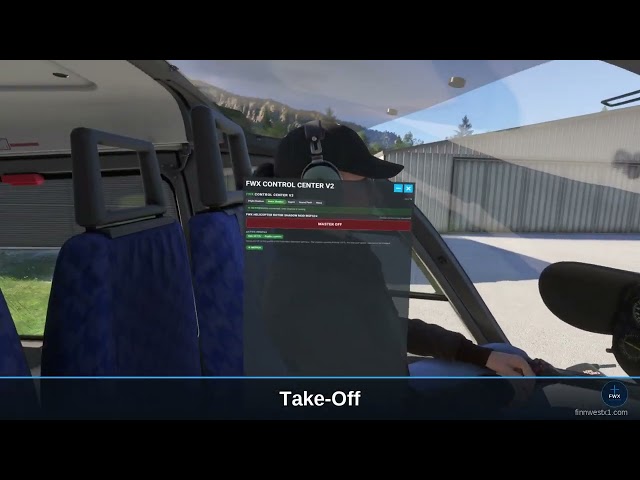
A full control panel sits in the simulator's toolbar, right where you open every other panel. Flight dynamics, rotor shadow and haptics each have their own tab in the FWX Manager: one click and everything is in the cockpit in front of you, in mid-flight. A master switch on top, the settings below, no switching to the desktop.
- Every change takes effect at once, no restart
- Settings are kept per helicopter, and the tested default can be restored at any time
Installation, notes and updates
- Click-through installer: pick the folder, done
- Note on package order: for the sound to take effect, the package order may have to be set by hand, in the settings of the simulator, in the package library section. The installer walks you through it with a confirmation dialog. This applies to this bundle as well.
- Starts and stops with the simulator, stays silent in menus and loading screens
- You can uninstall in two ways: through our own FWX application or through the Windows program list. Uninstalling brings the stock sounds back
- Free updates, new sound content and new features included
- If another helicopter missing its rotor shadow appears in the simulator, it is added free with an update
Included in this bundle
- FWX EC135 Real Turbine Sound Mod
- FWX Helicopter Rotor Blade Haptic
- FWX Helicopter Rotor Shadow Mod
- FWX Helicopter Flight Dynamics
The individual products
- FWX EC135 REAL TURBINE SOUND MOD MSFS24: the turbine sound only, for the EC135 only
- FWX HELI FLIGHT DYNAMICS & ROTOR EFFECTS: the three parts that work on every helicopter, without the EC135 sound
More information: finnwestx1.com
Tags
Requirements
- Microsoft Flight Simulator 2024 (PC, Steam or MS Store)
- Windows 11
For the FWX EC135 Real Turbine Sound Mod:
- Nemeth Design EC135 (Local Legend 21, free with MSFS 2024)
- One-time Package Load Order setting, the installer guides you through it
For the FWX Helicopter Rotor Blade Haptic:
- A bass shaker, tactile transducer or ButtKicker connected to a separate audio output
- Works with any helicopter in MSFS 2024
For the FWX Helicopter Rotor Shadow Mod:
- One of the seven supported helicopters, listed in the description
For the FWX Helicopter Flight Dynamics:
- Works with any helicopter in MSFS 2024
Recommended Products

11.99
€ 7.79
$
USD 13.68
All sales based on Euro. Other currencies shown as reference only.£
GBP 10.31
All sales based on Euro. Other currencies shown as reference only.¥
CNY 91.77
All sales based on Euro. Other currencies shown as reference only.
-35%
30-day price low:
€
11.99

€ 7.00
$
USD 7.99
All sales based on Euro. Other currencies shown as reference only.£
GBP 6.02
All sales based on Euro. Other currencies shown as reference only.¥
CNY 53.58
All sales based on Euro. Other currencies shown as reference only.
€ 24.00
$
USD 27.39
All sales based on Euro. Other currencies shown as reference only.£
GBP 20.63
All sales based on Euro. Other currencies shown as reference only.¥
CNY 183.69
All sales based on Euro. Other currencies shown as reference only.
€ 9.99
$
USD 11.40
All sales based on Euro. Other currencies shown as reference only.£
GBP 8.59
All sales based on Euro. Other currencies shown as reference only.¥
CNY 76.46
All sales based on Euro. Other currencies shown as reference only.
€ 9.08
$
USD 10.36
All sales based on Euro. Other currencies shown as reference only.£
GBP 7.80
All sales based on Euro. Other currencies shown as reference only.¥
CNY 69.50
All sales based on Euro. Other currencies shown as reference only.
€ 6.90
$
USD 7.87
All sales based on Euro. Other currencies shown as reference only.£
GBP 5.93
All sales based on Euro. Other currencies shown as reference only.¥
CNY 52.81
All sales based on Euro. Other currencies shown as reference only.
€ 14.99
$
USD 17.11
All sales based on Euro. Other currencies shown as reference only.£
GBP 12.88
All sales based on Euro. Other currencies shown as reference only.¥
CNY 114.73
All sales based on Euro. Other currencies shown as reference only.
€ 6.00
$
USD 6.85
All sales based on Euro. Other currencies shown as reference only.£
GBP 5.16
All sales based on Euro. Other currencies shown as reference only.¥
CNY 45.92
All sales based on Euro. Other currencies shown as reference only.